

How to Create a Useful Twitter Retweet Bot
Twitter can be used in various, almost countless ways. In this post I am sharing a tip on how to create a useful Twitter RT bot that can be used to collect various Tweets around a keyword or a hashtag and retweet them. And before you start throwing stones at me calling me a Twitter spammer, let me give just a few examples of how this bot can be used to create real value:
- Think of a Twitter RT bot that will be used to collect Tweets around some SEO conference. Thus all people who want to follow live updates from many members won’t need to keep track of hashtags and keywords associated with the event – all they need is to follow your bot.
- Or, say, you want to introduce your own cool hashtag and get other people to use it (#FirefoxFriday for example) but you want to filter out all retweets and give people the way to only follow real first-hand Tweets – a Twitter bot is the best option to go!
So, I guess I made it clear why you might find this tutorial handy. Now let’s see how to create one:
Create a Yahoo! Pipe
1. Choose the keywords / hashtags to retweet
Once you decided to create a Twitter bot, I suppose you already have the topic. So what you need to do now is to create a new hashtag to filter the Tweets (or just use the one you want to retweet);
2. Use Yahoo! Pipes to create a feed
The reason I use Yahoo! Pipes to create a feed is that Twitterfeed (I am going to use to auto-tweet) does not allow to use Twitter-based feeds and also Yahoo! Pipes offer some cool options allowing to customize the feed. So:
- Use Twitter search to grab the RSS feed:

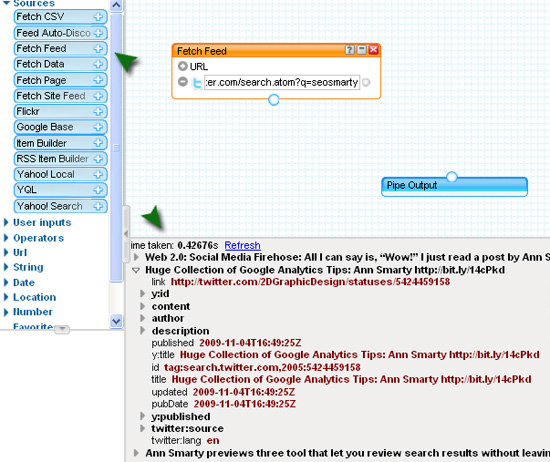
- Now, go to Yahoo! Pipes and click “Create a pipe”. Drag the “Fetch feed” item from the left-hand panel and provide your Twitter search RSS link. You should see the feed output at the bottom of your screen.
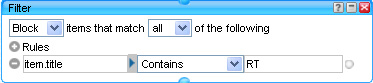
- Filter your feed. Now, there might be plenty of retweets of the initial Tweet using your key hashtag – and you don’t want your bot to repeat one and the same update again and again. So you can go ahead and filter out all Tweets containing “RT” ( “Retweet”, “Retweeting”, etc):
Drag the Operator > Filter pipe from the navigation and add the following:
Now, connect all three pipes (feed, filter and output) together and you are done!:

- You can also give credit to the initial update author (RT @username) for the bot’s update to look like this: [the initial message here RT @tweet-author]. This part is a bit more complex.
1.First, drag Operators > Loop Pipe and insert it before the “Pipe output” Pipe;
2. Now, drag String > String Builder Pipe right in the middle of the Loop Pipe and do exactly what is shown on the screenshot:
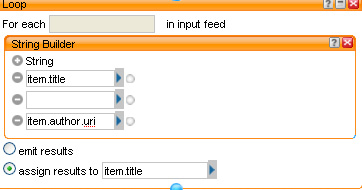
You should see now that the feed output contains the URL to the initial author profile:

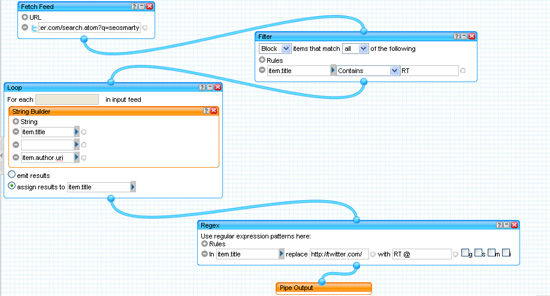
3. Now you should cut the first part of the URL and make it @author. For that grab Operators > Regex Pipe and there in item.title replace http://twitter.com/ with RT @

(!) Don’t forget to connect the last pipe with the other ones – so that in the end our Pipe looks as follows:
And the output looks like this:

![]()
Save the Pipe and grab its RSS.
Set up the Auto Tweets
All what follows is quite easy:
1. Create your new Twitter profile to publish the Retweets,
2. Connect it to Twitter Feed and set up the auto-retweets there:

Congratulations! You are done!
Can you think of any really creative uses of this tip? (Please don’t spam Twitter!)
Related posts:


33 Responses to “How to Create a Useful Twitter Retweet Bot”
Yahoo! Pipes is an amazing tool. Great post!
By Tanner Hobin on Nov 12, 2009
Great use of Yahoo Pipes. I’ll give it a try later. Thanks for sharing it!
By Blog on travel on Nov 12, 2009
I came across this a while ago and I’ve been meaning to test this to see how helpful it is retweeting potential link partners tweets for aquiring links
By Leo Fogarty on Nov 12, 2009
Sounds interesting, gonna give it a try in the morning.
By Gareth James on Nov 12, 2009
I don’t understand how you can be a twitter spammer. Spam is unsolicited. if you follow someone’s twitter feed, then by definition you have solicited that person’s tweets. ??
By Jenny Talia on Nov 16, 2009
Even if your not following someone and they mention your @username in a tweet you’ll get it in your “mentions @username” thus spamming you
By Leo Fogarty on Nov 16, 2009
ah. but it is still solicited. it is how the system works. you get tweets directly from the person you want to read and you get retweets. as a subscriber, it comes with the territory.
meanwhile, twitter needs to allow users to filter out retweets/mentions @username to give users more control over the experience.
By Jenny Talia on Nov 16, 2009
Very useful tips. I have been using Yahoo Pipes a long time ago but not yet tried on this. Thanks
By Tinh on Nov 16, 2009
I took the plunge and logged into yahoo pipes and tried this myself. Your instructions were perfect. I can now RT on any topic I want.
Thanks!
By Richie on Nov 17, 2009
Hey ! Thanks a lot. This is interesting and it seems very useful I am going to try it, for sure.
By Anne Ross on Nov 18, 2009
ZOMG! Bunch of spammers! :O
By Harry on Nov 19, 2009
Be patient on the Twitterfeed step.
Twitterfeed has known connectivity issues with Yahoo Pipes. If Twitterfeed says it can’t validate the feed, just try again until it can.
See this thread for more info:
http://getsatisfaction.com/twitterfeed/topics/_we_couldnt_parse_this_feed_for_valid_url_feed
By Hendy Irawan on Nov 19, 2009
Not only I was given Captcha, the SK2 also given PHP errors:
Warning: session_start() [function.session-start]: Cannot send session cache limiter – headers already sent (output started at /home/content/a/n/n/annsmarty3/html/wp-content/plugins/SK2/sk2_second_chance.php:2) in /home/content/a/n/n/annsmarty3/html/wp-content/plugins/enhanced-wp-contactform/wp-contactform.php on line 264
Thank you. Your comment has been approved.
By Hendy Irawan on Nov 19, 2009
Hey Hendy, no idea what the problem with SK is. Usually it works pretty well. Sorry for that.
And thanks for bringing that issue to my attention.
By Ann Smarty on Nov 20, 2009
HI
Twitter is one of the best site where we can do marketing and it return the credit in the shape of visitors.
By Web Marketing Services on Nov 23, 2009
This is very interesting and useful. Thank you….
By Loren on Nov 25, 2009
Your article about Twitter Retweet Bot is very interesting… Thanks for the information…
By Fajardo on Nov 25, 2009
I like your instructions very much. I’ll try to create my own twitter bot soon.
Thanks.
By Nikita Sumeiko on Dec 18, 2009
Same article I saw somewhere with yahoo pipes & twitterfeed
By Athul Jayaram on Dec 30, 2009
I was looking for this type of information. Thank you.
By Allen on Dec 31, 2009
Great and useful article! Am using Google URL Shortener integrated in Google FeedBurner! It’s better and more real-time!
By Yadhav on Jan 1, 2010
I get a (503 Service Unavailable) for the search.twitter.com feed… Has anyone else got this and know a fix for it?
By sapp on Jan 10, 2010
yeah, 503 error all day, yo. what up with that? anyways, every few hours it looks like something gets through, but for the most part, 503
By matt on Jan 11, 2010
Hi Ann, just checking out your blog, fantastic tutorial here. One thing that I think may be missing here is creating blog posts from this piped and aggregated content, then sending to Twitter.
Despite what others say about automating Twitter Tweets, I believe I read somewhere that 70% of all Tweets are bot-generated anyways, so there’s no harm in doing this in my opinion.
If Yahoo Pipes creates an RSS feed that TwitterFeed can work with, then a blog running WP O Matic or FeedwordPress could aggregate that same RSS feed, and post the pulled content as a draft.
You could then write a few sentences introducing the source of your information, then link to source, then publish your blog post.
Then TwitterFeed will pick up your blog’s RSS feed (more reliably than a Yahoo Pipes feed) and send it on to Twitter.
This method allows you to add content to a semi-automated blog, giving your more and more indexed pages and the crux of what you were trying to do (gather together info on a certain topic) has still been achieved, just in 3 places instead of 2 (Yahoo, Blog, Twitter, versus Yahoo >Twitter)
You could also use Delicious Tags to create RSS feed for whatever url you want and your Delicious Tags go into a dofollow RSS feed which could be sent to a semi0automated blog then to Twitter etc….
I wrote about Delicious links here on this post
http://linkvanareviews.com/delicious-links-and-how-to-get-dofollow-links-from-delicious
Thanks,
Dan
P.S. Going to spend rest of day doing SEO brain games, thank you very much!
By Daiel McGonagle on Jan 20, 2010
thanks .. a great info
By party on Jan 22, 2010
How could I change this to reply to the person that tweeted rather than retweet them?
Thanks.
By Mark on Feb 1, 2010
There are thousands of pipes already available for mash ups. I’ve noted some of the unique and best pipes for everyone to use.
http://www.tutkiun.com/2010/02/unique-and-useful-yahoo-pipes-list.html
By Mayur on Feb 20, 2010
I have to ask, as it isn’t obvious from your post. Can you create a bot that retweets multiple phrases? I have set up a test ot using your principles, but can I get it to retweet various hashtags or searches? If it’s possible then what is the easiest way to do it?
By Synonymous on Mar 4, 2010
@Synonymous, all you need to do is to create multiple Twitter search feeds, like I did in this post: http://www.searchenginejournal.com/diy-seo-keyword-tracking/15043/
By Ann Smarty on Mar 4, 2010