
 [Update: This trick seems to have been discontinued]
It is amazing how many new things we may discover in very familiar services by just experimenting… I’ve been using Google for ages and I am quite familiar with its advanced operators but I just discovered a new one a couple of week ago.
Actually, I’ve been aware of it for quite some time but I thought it was supported only by Blog Search (and it never occurred to me to use it anyway) until one of our very awesome moderators shared it worked great in Google as well.
The operator is INPOSTAUTHOR:”Author Name” and it allows to filter search results by the author name. Try! [inpostauthor:”ann smarty”]
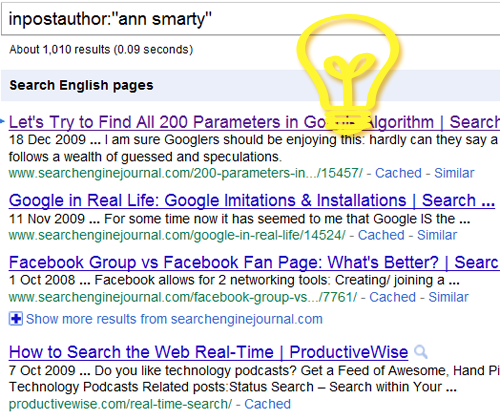
Now, if you come to think of it, there may be some great ways to take the full advantage of it!
Table of Contents
Search For Guest Blogging Opportunities!
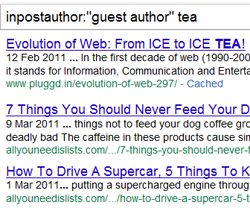 If you guest post (and if you are following me for some time, I may have already persuaded you to start guest blogging), this operator could turn a life saver for finding new guest posting opportunities.
Let’s create some smart search queries:
- inpostauthor:”guest author” {your topic here}
- inpostauthor:”guest post” {your topic here}
Let’s try to broaden the search by including each of the slight variation above:
inpostauthor:”guest post” OR inpostauthor:”guest author”{your topic here}
Tons of new guest posting opportunities you would never be able to find otherwise! Some of them are not even labeled as “guest post” in any way – but they are!
Now, try playing with search sidebar looking for the most recent guest posts (some of those blogs may have just started accepting guest posts, so you’ll be one of the first featured!)
Follow Any Author
Remember that sweet little tool that lets you create daily email alerts of new search results indexed within the past 24 hours? All you need to is to search for your favorite author (let it be me… what? I am the owner of this blog: I can do whatever I want here 🙂)
[inpostauthor:”ann smarty”]
Click “Show more options” to the right and filter the results to see those indexed within past 24 hours. Now grab the resulting URL and create a new free alert in the TrackEngine.
Alternatively, you can use Google Blog Search, filter results and:
- Subscribe to RSS to track your favorite author throughout all blogs he contribute to;
- Subscribe to email alerts of your favorite author’s new articles;
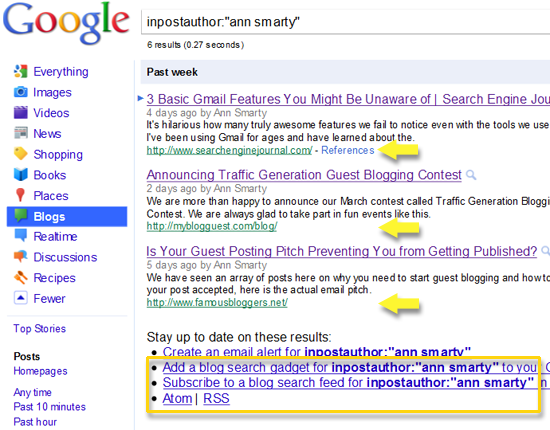
Note: You may see some content scrapers now and then which you can filter out with help of [-site:scraper.com]:
inpostauthor:”ann smarty” -site:scraper1.com -site:scraper2.com -site:scraper3.com
3. Aggregate Your Articles in One Place
If you do a lot of guest posts (and I hope you do) or contribute to multiple blogs on a regular basis, you may want to collect your posts in one place. The above Google Blog Search RSS feed would work like a charm for that!
Note: Obviously, it will only pull posts where you contribute from your own author account.
All you need to is to grab RSS link (framed in yellow in the above screenshot) and use either (or both of these plugins):
- RSS Import to embed your posts in your blog sidebar;
- FeedList to embed your posts in any page
Ann Smarty’s Articles:
Hope it will turn useful!
Note: I just want to apologize to all my readers that I don’t update my blog too often. The thing is that this blog is too special for me. I only post here if I really have something really useful to say. So stay tuned!
cc licensed flickr photo shared by Pink Sherbet Photography


