
How To Call To Action
More often than not, it is not enough for you that your visitors just come and go. You want them to do something at your site. Unfortunately usually webmasters pay too little attention to their calls-to-action focusing on design, content and SEO. It is sad to see truly good resources that are doing great in SERPs but fail to engage their visitors.
Calls to action may vary. You may want your visitors to subscribe, to register, to buy something, to bookmark your post, etc. With calls to action everything is important: the color of your buttons and supporting elements, the language you use to describe the action, the place on the page where you locate them, the additional elements that encourage people to act. All these elements should be consistent and support each other getting your visitors one step closer to their objective.
The Color Of Call-To-Action
| COLOR | NATURE OF ASSOCIATIONS | WHERE TO USE | DRAWBACKS |
| Red | increases your heart rate by activating your pituitary gland | a classic call to action color | might be associated with debt and danger |
| Yellow | the first color a person sees | draw attention to your call-to-action | |
| Orange | combination of aggressive red and cheerful yellow | perfect call-to-action | |
| Blue | may make your visitor reconsider the action | ||
| Green | the easiest for the eyes | good for testimonials, founder’s story, etc | |
| White | gives other colors prominence | make your call-to-action stand out |
Based on Which Color is the Right Color?
The Words For Call-To-Action
1) Your call-to-action should make it clear what the site is about.
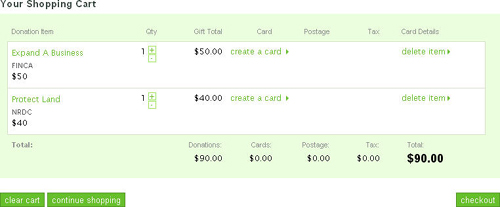
I was browsing some non-profit organizations the other day and came up to a good example of how to use inappropriate vocabulary when talking about donating. Here is a nice site asking for donations to “make the world better”: if you want to donate money for a good cause, you need to (1) add your donation to cart, (2) view your shopping cart and (3) checkout. Do you still feel you want to make a donation? Me not. With words like these donation (that is supposed to make me feel happy for “making the world better”) gives me the feeling I am buying a bar of chocolate.
2) It may also be wise to scatter several calls to action throughout the site making the most of synonyms and encouraging words to:
- Explain how to make an action (e.g. “Click here to buy”);
- Use ’softer’ calls-to-action (e.g. “try it” instead of “buy it”);
- Imply immediacy of the action (e.g. “Buy now“).
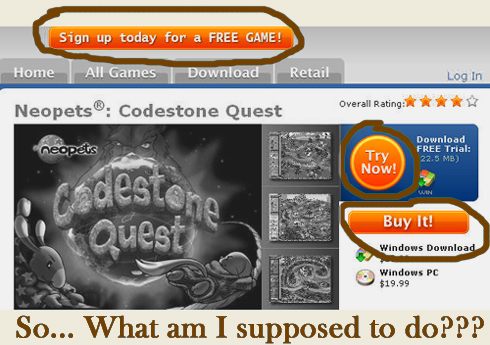
! Important note: Using several calls to action is OK unless this tactic promotes FUD (i.e. fear, uncertainty and doubt) or distracts attention:
Where To Call To Action?
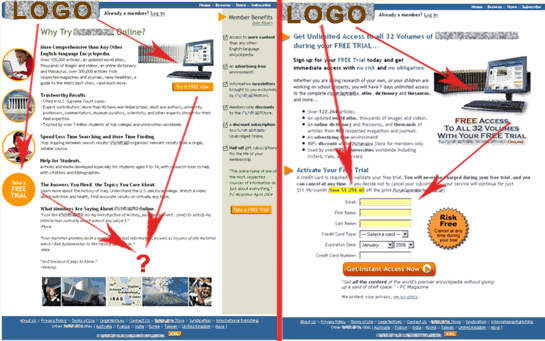
A great research by Marketing Experiments showcasing the landing page optimization suggests placing a call to action along the customer’s eye path (that you build by your design elements) through the page. Look here:
A Few Examples?
Two helpful links that can demonstrate the theory summed up above: call-to-action button collection and add to cart button collection (each linking to a merchant’s site); so see for yourself! (I personally find most of them painfully poor examples of calls to action.)
Related posts:


63 Responses to “How To Call To Action”
Love your example of the color of call to action. That is very helpful.
By Kristen on Feb 1, 2008
Great post Ann, sphunn and tagged at delicious for future reference. My latest call to action in my sidebar is Yellow, will be interesting to see how it works (red just wouldn’t work with my colour scheme)
By Glen Allsopp on Feb 2, 2008
Great reference material Ann, the more I read the more It reinforces my admiration of your no-nonsense this is what works (no drama) SEO style. Priceless…
By SEO Design Solutions on Feb 2, 2008
(copy paste from Sphinn)
I got alot out of this Ann thank you.
It’s interesting to see the different angles that can be taken in reference to color relating to call-to-action.
(“Great post!”) wink
PS-For the books: I was your official Hot Sphinn. (#22)
By spostareduro on Feb 3, 2008
I’ve been trying to read up on improving my site. Thank you for the very informative article especially the way you use a table to in presenting the way colors affect a site. Would definitely try to apply them on my site.
By TxTu on Feb 3, 2008
Ann, how the hell did you acquire so much knowledge so fast? Nice pics at the end especially, regarding using calls-to-action where the eye is drawn naturally. Smart idea, and I’m going to be integrating that asap
.
By Gab "SEO ROI" Goldenberg on Feb 4, 2008
Hi Ann. This is EXACTLY what I was looking for. I wanted to know what colors are associated to certain actions. Thanks for the short but concise read (my favorite type of writing…big plus when @ work as you can imagine
).
By Giun Sun on Feb 4, 2008
Thanks for your helpful post. To find the optimal place for calls-to-action you can use heat maps as well. They show the most eye-catching sections on the page by marking them in red, orange and yellow – actually, these are popular colors while talking about call-to-action
By www.copywriting911.com on Feb 4, 2008
@ Kristen: Thanks, I hope it helps.
@ Glen: I just sent you an email, please let me know your thoughts.
@ SEO Design Solutions: Thank you for the compliments
@ spostareduro: My official Hot Sphinn? Thank you, dear, nicely done
@ TxTu: if you do, please share your experience;
@ Gab: Lol… I am planning to write a post at Youmoz sharing my experience of doing a research.
@ Giun Sun: Yes, I try to keep it short and informative. I am glad you like it.
@ http://www.copywriting911.com: That is actually a great point! I will have to look into it!
By Ann Smarty on Feb 4, 2008
Finally, a call-to-action post that integrates color choice! I’ve seen studies that say “green button converts x% better than orange” for example. This color chart should be considered from branding-day-one! Nice post Ann!
By Linda Bustos on Feb 4, 2008
Um, does this mean that I’m screwed because my blog template uses a lot of blue…?
Then again, it’s not an e-commerce site, it’s a blog…
By Mark Dykeman on Feb 4, 2008
@ Linda: Thank you
I’ll try to find more info on colors.
@ Mark: Nope that doesn’t mean you’re screwed. Actually this post is about calls to action, not overall site theme. Your call-to-acton (feed button) is orange. You might want read about colors in general in my previous post: blue is believed to be the color of trust
By Ann Smarty on Feb 4, 2008
What a great post Ann! I have been doing a lot of on-page conversion optimization lately without much luck, so this is extremely helpful!
what do you thinking about using these colors while still maintaining a site/company color scheme?
Recently i’ve been working on conversions for one page on our site in particular. I want to make the CTA button very obvious but I can’t use any loud colors because it throws off the scheme.
By Calamier on Feb 4, 2008
Nice post, Ann.
Like you say, it’s sad to see how many get this one wrong, as this is the single most important thing for good conversion of your website.
A good contrast is important which is why white might work very well on a bright red website but not on a white one.
Look forward to see your YOUmoz post on your research
By Hjortur Smarason on Feb 5, 2008
@ Calamier: Thanks
My advice is to use calls-to-action that fit the color scheme. If your call to action is not consistent with the overall site look, it can make visitors feel insecure. The best way is to keep everything in harmony. Try experimenting with different color shades and I am sure you will find the golden middle.
By Ann Smarty on Feb 5, 2008
Hmmmm…. Great post and damn you.
I actually have a draft post for SEOmoz that is very similar, but not identical, to the topic of this post.
But it looks like you stole my thunder.
I’ll have to go back over my draft again to make sure I don’t pollute the blogosphere with any redundancy.
By Vinny on Feb 5, 2008
Oh and BTW – speaking of calls to action – if you’re going to keep writing great posts like you have been – you’re going to need to put one of those blue sphinn badgy things on your blog posts.
That will make it much easier for all of us.
By Vinny on Feb 5, 2008
@ Vinny: Lol… I am sure your post is going to offer a completely new perspective – so I beg you to post it at YOUMoz…
And oh, yes, I will be optimizing for Sphinn today (or tomorrow) – I do suffer from lack of free time
By Ann Smarty on Feb 6, 2008
This is probably the best analysis I’ve seen for creating an effective call to action on a website. I submitted it to bizSugar.
By John Holsen on Feb 7, 2008
Hi Ann,
Good job making Call to Action improvements easy to understand, and glad you liked our research brief. We appreciate you citing it.
Here’s another research brief on improving Calls to Action that your readers might be interested in: “Landing Page Optimization: Increasing Conversion by 150% and Lead Gen by 2,379% with an Effective Call-to-Action.”
It’s in our free research archive at http://www.marketingexperiments.com/improving-website-conversion/increasing-conversion.html
Your readers might also be interested in attending our next live Webinar, where our team will give landing page optimization recommendations for pages submitted by our subscribers. This is part 2 of the free Clinic we gave this past Wednesday. The web clinics are always free.
Cheers,
Peg Davis
Writer
marketingexperiments.com
By Peg Davis on Feb 8, 2008
Really impressive, I loved the examples you used.
Do you have any data on how other means of ‘closing’ can be used? Like an assumptive close once you lead them on a sales path for a certain amount of time?
Just found your blog and have read most of your posts, great insight and easy to read – keep it up.
By Mike Tighe on Feb 10, 2008
@John Holsen: Thanks, John! Highly appreciated.
@Peg Davis: Thank you for stopping by and for the link. I will definitely join one of your upcoming webinars.
@Mike Tighe: a very good question! I will have to explore it and post a follow up here.
By Ann Smarty on Feb 11, 2008
nice post!
By Luis on Feb 26, 2008
Fascinating color work. One of the more effective opt-in pages has
1. A red outline,
2. A yellow box with
3. Orange background opt-in forms.
Cute, huh?
There was another study, which I forget right now (it was pre-Internet) where pink fliers were most effective for new clients, and yellow was better when they had already taken one service and needed to move up (the funnel). Green was for donations…
By Robert Worstell on Feb 29, 2008
@Robert: If you find the link, drop me a line – I am still exploring the topic.
By Ann Smarty on Feb 29, 2008
Hi ,
We’ve just created a list of “Checkout Buttons”
I hope you’ll find it interesting.
You can see the list on the Checkout Buttons page, as long with some interesting statistics about them.
Cheers,
Traian
By Traian on Sep 25, 2008
Hi Ann,
Really great information you provide us in such a simple words. We all are really thankful for the article.
By seo-services on Sep 25, 2008
Wow!!! Good job. Could I take some of yours triks to build my own site?
By lhuv on Sep 29, 2008
Thanks so very much for taking your time to create this very useful and informative site. I have learned a lot from your site. Thanks!!
By Siber on Oct 1, 2008
I like it and the background and colors make it easy to read
By Robert on Dec 14, 2008
I like the idea follow the customer’s eye path. Clear, direct, and no hesitation.
By wholesale electronics on Dec 15, 2008
on ars technica there is this article about color perception.
By Simon Goat on Feb 9, 2009
Another happy subscriber here
Great Job Ann!
I came here looking for best practices related to putting up phone numbers on the site and get the phones ringing. What are your thoughts about placement, text, colors and icons that get the job done?
By OSHA Training on Jul 18, 2009
@OSHA Training, hey there! Good question. There is not much I have researched there but I definitely should and will…
By Ann Smarty on Jul 22, 2009
Thanks for the great tips, I am testing out different colors for our call to action buttons. We have had the best response with green actually.
By SEO Moves on Jul 23, 2009
Nice post Ann, I love the colour analysis, I’ve picked red as it’s bold and it works well with my other colours, orange was a little too subtle unfortunately!
By seb on Jan 21, 2010