Practical Guide to Finding Link Bait Inspiration
If you're new here, you may want to subscribe to SEO Smarty's RSS feed. Thanks for visiting!
One of those tactics that keep working for me is creating viral pieces (like long lists full of cool images) that attracts thousands of visitors and dozens of links. People seem to never grow tired of “20+ Weird Something” (I myself am guilty of regularly sharing these types of content with friends via IM and social media). So why not try them if they work and entertain people (looks like a win-win to me)?
As I’ve been playing with them for a while, I decided to go ahead and share my sources of inspiration (in a hope you’ll share yours in return).
1. Google Search
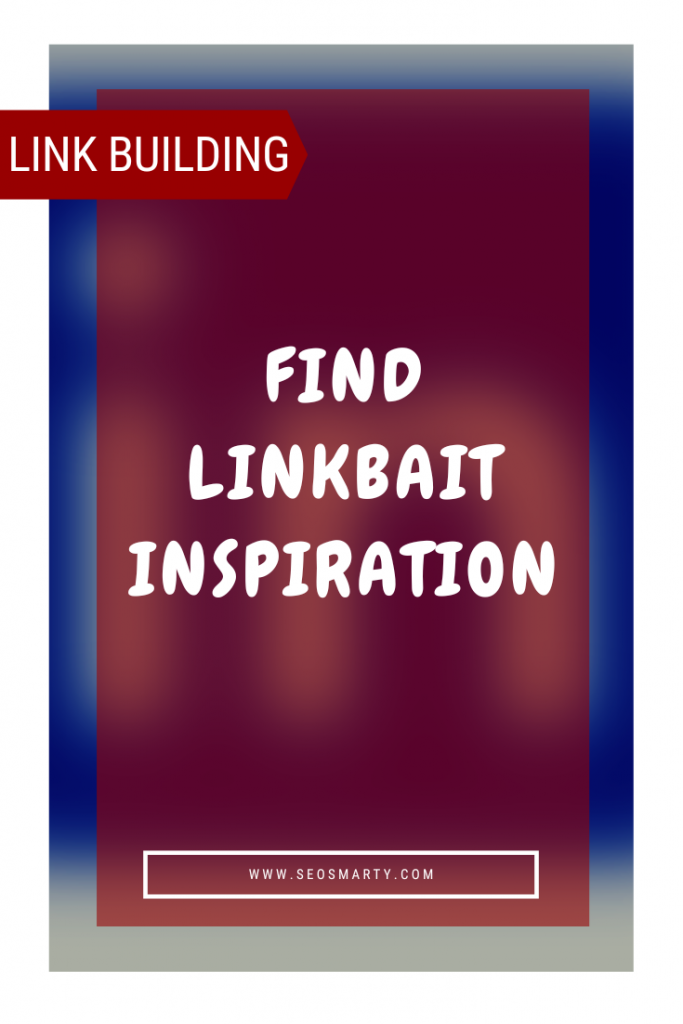
Good old Google search is quite understandably my first source of inspiration. Here’s one trick I’d like to share that always works: Google wildcard search. Just insert * anywhere in-between your topical search phrase and you’ll get plenty of suggested term variations right within SERPs:
- [amazing * swimming pools] for more ideas on swimming pool designs;
- ["what kind * are you"] for more viral quiz ideas;
- [weird *] just for something bizarre.
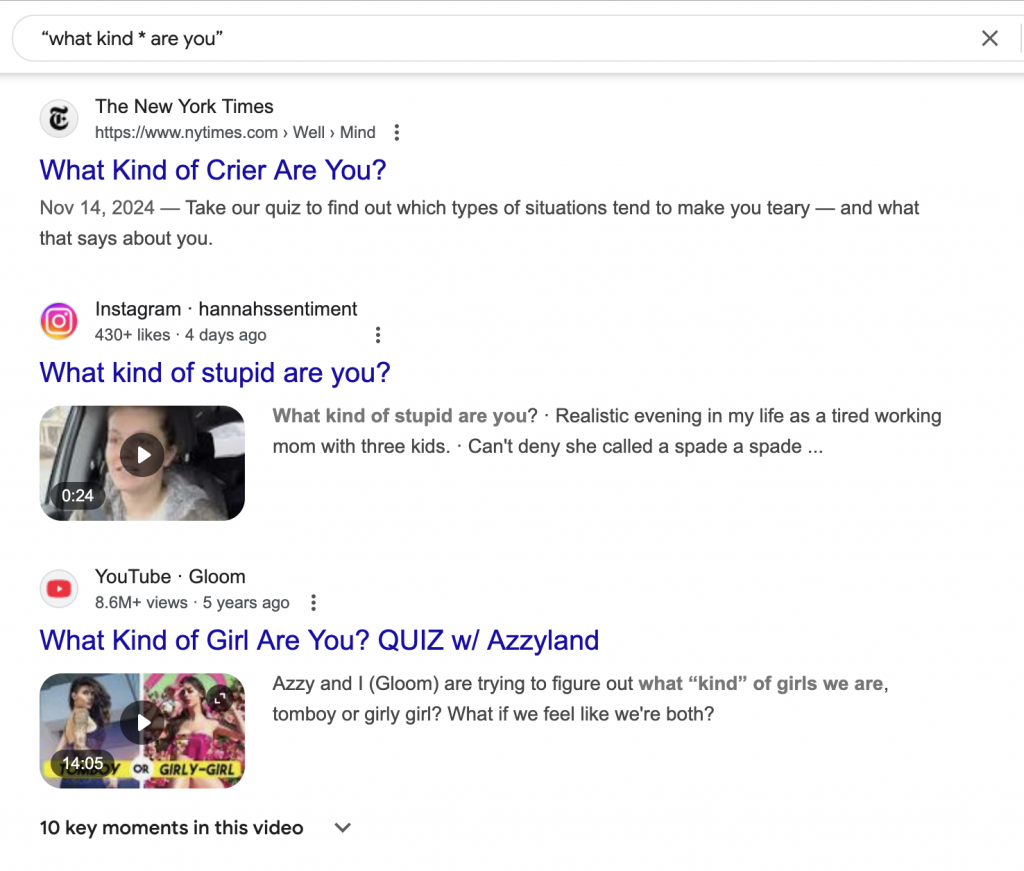
Quick tips:
- Use usual “viral list” cliches to get more ideas (amazing * word, awesome * word, weird * word, bizarre * word, etc). Note: in case Google decides to drop the word as being “descriptive and unimportant” be sure to place plus sign (+) before it to force Google to include it;
- StumbleUpon addon installed with search integration activated helps much to quickly make judgments as to how popular each article might be (see the stars indicator in the screenshot above)
2. Google Images
I use Google images more and more lately. Most importantly, it allows great visualization: you almost always can predict which type of content each listing represents: an ecommerce shop, “viral” blog post or any other. Thus, you only click through if it looks like something worth attention (=saves time a lot) Look:
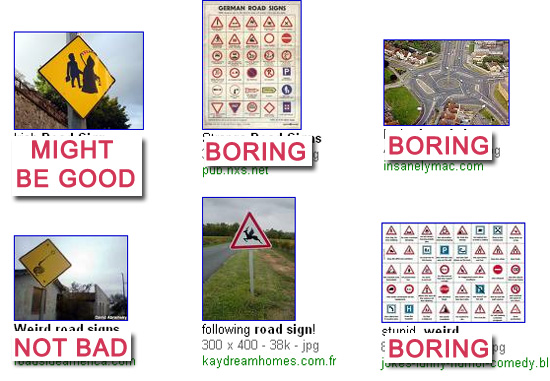
Besides, Google images search seems much more straightforward than general search: those images that are linked to, contain search terms in alt text and file path are usually ranked higher. So first pages will contain plenty of images from viral pieces like you do (other types of content seldom put so much emphasis on images).
3. Digg Search
I hadn’t used it before it was improved so it is hard to tell how much better it became but now I just love it! Here’s a quick guide:
- Go to Digg;
- Provide your base search term and include +p to make it show only those stories that hit the front page.
That’s usually enough to get an idea of what type of topics end up going popular on Digg.

Here are a few more useful Digg search filters:
- Narrow search by media (stories / videos / images): search sidebar option;
- See only popular stories on your topic coming from one particular site (site:domain.com);
- Add +b to see buried stories (another very essential option for your topic analysis).
4. Flickr Groups
Flickr is an awesome source of inspiration. Last year I did a detailed post on Flickr search tools that make searching it much easier. Another useful tip that always turn effective for me is browsing through Flickr groups that unite photos on one particular topic.
While I didn’t have much luck finding really cool Flickr groups through its built-in Groups search option, I came up with an alternative way:
- Search all images using your base term (and probably using one of the tools mentioned above);
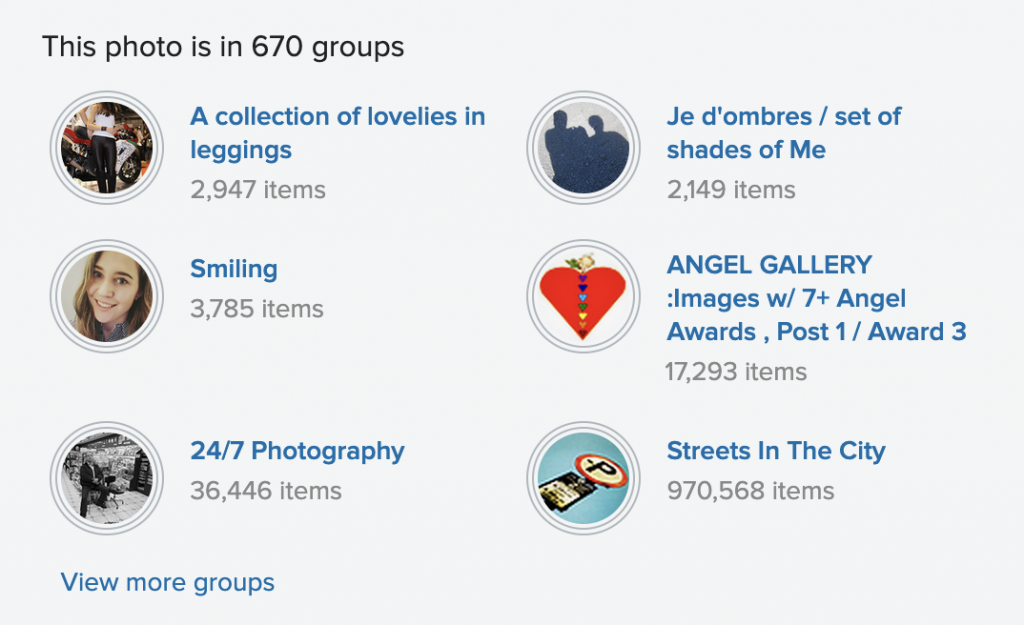
- Look which “pools” most popular / commented / favorited images belong to. Chances are, you will find many quality relevant Flickr groups this way:
5. Inspiration “Lucky” Buttons
Oftentimes. you just don’t even know the base words: you just need something awesome to write about. Or you’re just stuck and need something completely new and fresh. Or you have much free time (which is unlikely, I know).
In all those situations, just clicking through random links and scanning everything that comes up is the best thing you can do. Here are a few tools that will help:
StumbleUpon ToolBar “Stumble!” Button
- Just click it and you will be shown most popular stories that are likely to appeal to you (based on your preferences and SU browsing and thumbing history).
- You can also customize it to show (a) pages from one of the channels, (b) pages thumbed by your friends, (c) pages related to the term you specify:

FriendBar “Lucky” Button
FriendBar is a FireFox addon that aggregates your Facebook and Twitter accounts allowing you to track updates in both social media networks. One of its features is a “Lucky button” that shows you a random story currently popular on Twitter.
Yoono “Surprise” Button
Yoono is another FireFox addon that creates a handy “social” sidebar in your browser aggregating your Twitter, Facebook, Piczo, Flickr and Friendfeed accounts. By clicking a “Surprise” button at the bottom of the widget you will be taken to a random page.
- The button sows the most relevant page based on the content in your bookmark folder.
- You can also ask for a “surprise” based on one of your bookmark folders.
- You can check an option to have a surprise each time you launch your browser.
Digg Random Story
Digg FireFox Extension (among other cool features) shows “Random” Digg story to diversify your browsing experience. This way it give some SU feel to Digg which can also turn useful at times.
Any inspiration tips to share? Share them in the comments!
Related posts:


75 Responses to “Practical Guide to Finding Link Bait Inspiration”
Nice top 5 ways to create linkbait list you have there!
By Ecommerce adviser on Sep 28, 2009
google search option is really fantastic…
Thanks
By dhiraj on Sep 29, 2009
I am using google images a lot too nowadays. Even I look for the Top 20 list posts everywhere. Most of them are informative.
By Mundir Razik on Sep 30, 2009
I think the below method also works fine to get link baiting inspiration:
http://searchengineland.com/how-to-research-create-and-distribute-highly-linkable-content-22416
By Alex on Sep 30, 2009
Hey Ann
Great list – we follow a similar one when we we create new bait.
I would also reccomend checking out deviant art – it can have some great images that most people have not seen before.
Thanks
Danny
By Danny Ashton on Sep 30, 2009
Great Post Ann! Very useful now that I’m blogging in a more organized fashion. I would also add forums in your list, by browsing the most popular threads.
By Cristian @ Maquina Studio on Sep 30, 2009
Just found your blog through Sphinn. Great stuff! Keep up the good work and blog on!
By Todd Buckton on Oct 1, 2009
These are very interesting methods of gathering inspiration. I often times find myself really trying to reach for material to write about. These methods should pull up some very interesting news topics.
By Nick Stamoulis on Oct 2, 2009
Thanks for the inspiration. 20+ weird lists are something very useful and fun to make.
By seo-girl on Oct 2, 2009
Very great tips, i have tried it and digged my post, i got over 40 diggs in about an hour
By Ben on Oct 5, 2009
Hey great idea!! I’m going to bookmark your site.
By Keegan on Oct 6, 2009
Thank You! Killer tips! We sell a rather boring product you’ve just given me the inspiration and the tools to help make marketing them more exiting!
By Lyn on Oct 6, 2009
Nice ideas – I like the picture examples. I’ve seen a lot of those ‘What Kind of X are you?’ titles on Facebook, so I guess you must be right!
By annabelt @ Ebusiness Technology on Oct 7, 2009
Very helpful guide. I really don’t do link bait articles as much as I should, but with this I think I’ll start getting into it much, much more.
By Noah | WealthNet Partners on Oct 8, 2009
Thanks for the post. A lot of great tips and good advice for finding the right “stuff”.
I also liked the way each of your suggestions attacks the problem from a different approach.
Thanks for the help,
Miguel
By Miguel on Oct 12, 2009
NICE LIST!! thanks
By Morten foto on Oct 15, 2009
Hi Ann,
Great post! I use the Shareholic add-on for Firefox, and it has a Buzz feature showing trending topics on Twitter, the web, etc.
By Gail on Oct 16, 2009
Seems like you got your wish! So many trackbacks. I get inspiration from monitoring Twitter feeds in my pre-chosen “niche” of journalism in the US. If you can find that enough people are asking the same question…answer it!
By Case Ernsting on Oct 19, 2009
Really like the top 20 list, think it is a great idea!
By Patrick Murphy on Oct 21, 2009
I like the part about Flickr Groups. It gave me some good ideas. Thanks.
By Søren Lærred on Oct 21, 2009
thanks that was a great read…
By search engine optimization marketing on Oct 23, 2009
Great it’s a new searching i heard.
By Ashok kumar on Nov 17, 2009
I wrote a small “how to” write linkbait guide on my site as well. I focus on a more “holistic” method, but certainly looking to what has worked before is an important skill to create relevance.
Nice write up,
Josh
By Josh - Phoenix SEO on Nov 21, 2009
Getting quality back links is essential form seo point of view.very useful i am getting good traffic and back links with the help of these link building techniques.
Thanks for sharing your knowledge.
By SEO experts on Jan 2, 2010
It’s not so simply to make a pretty good custom written essay, preferably if you are engaged. I recommend you to find buy essay and to be free from scruple that your work will be done by custom writing service
By AlexaTF on Jan 22, 2010
Great work! Tip for google search is very useful. Thanks!
By Are on Mar 8, 2010