
 [Updated on November 2021]
Long time ago I wrote a short (yet quite complete) post on image SEO which obviously needed an update, so a couple of weeks ago I wrote a bit more detailed and up-to-date article on optimizing images for search and social media.
Image optimization is important for many reasons, including better performance, faster site speed and better rankings.
Today’s article lists most essential WordPress plugins to optimize and make the most of your image content you post on your blog.
That’s not yet another 20-best-plugins article listing an enormous number of more or less useless plugins you don’t want or need. Here are the 5 most essential ones you *must* have to see your traffic spike!
SEO-Optimize Images: File Name + Alt Text + Size
1. Optimize Alt Text and Title of Images
SEO-Friendly Images is the plugin by the awesome Vladimir Prelovac (who obviously knows a thing about WordPress SEO). It helps you optimize all your existent and future images by automatically adding an alternative and TITLE text to them. It lets you:
- Automatically add the alternative and TITLE text to your images where you already don’t have either.
- Make the the alternative and TITLE text different by combining the following four variables:
- %title – replaces post title
- %name – replaces image file name (without extension)
- %category – replaces post category
- %tags – replaces post tags
If you’ve been wondering about the purpose of the alt text and title attribute for images, here’s a very concise chart that makes the difference obvious:
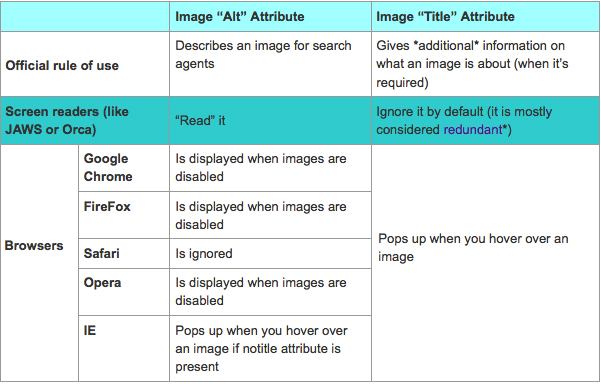
(Note: they are both more or less essential for SEO nowadays, but that’s not the reason to make the two identical just in case)
2. Optimize image file names!
While being (arguably) not the most powerful SEO-relevant image element, the file name is crucial for getting your images to rank in image search results.
Media File Renamer is the easiest plugin ever and with only one functionality: it adds an option to change the image URL slug (i.e. image file name) to optimize it. To change the image file name, just change the title field when uploading. Easy but pure gold!

3. Optimize the Size and Image Load Speed
Nowadays we are all well aware of the importance of your page load speed for SEO and user experience. Google loves fast pages and images can make your pages much slower.
WP Smush.it is an invaluable plugin that uses the awesome Smush.it API to optimize the images you upload to your blog on many levels:
- It compresses the images to load them faster;
- It strips unnecessary colors from indexed images;
- It converts certain GIFs to PNGs for better performance.
It works for the new images “behind the scene”: just upload images and it will optimize them. It can be run for already published articles from your “Media Library”
 Note: This one may have your site hang for quite some time, so run it on the slowest (least active) day and time.
Protect Images: Watermark
5. Automatically Watermark Your Images
Easy Watermark is a cool plugin that adds a watermark to images you upload to your blog. You can configure it to:
- Set the image type you want watermarked;
- Align the watermark;
- Set the color and size of the font:
+1. Protect Images from Downloading and Re-Using
(I am not using it myself as I seldom use my own images, but I can definitely see the value of it!)
No Right-Click for Images is the essential plugin, especially if you are the creator of the images you upload to your blog and you don’t want them to be re-used. It won’t help for all cases of plagiarism but it does what it does: the plugin doesn’t let your readers use the right click on image files to copy or save them.
| WordPress plugin for image optimization | What does it do? | Bulk-updates previously uploaded images (in old posts)? |
| SEO-Friendly Images | Adds image alt text and title attribute | Yes |
| Media File Renamer | Adds the option to change image file name (URL slug) | No |
| WP Smush.it | Optimizes image size and load time | Yes |
| Easy Watermark | Adds your brand watermark to all images you upload to your blog | No |
| +1. No Right-Click for Images | Disables right-click on image file to prevent them from being downloaded | Yes |
Any other essential plugins for image optimization? Please share your thoughts in the comments!
cc licensed ( BY ) flickr photo shared by MahPadilha


